Audio Guides Webapp
I enjoy traveling and I am especially interested in history. Before a planned trip to Oman, I realized that finding the kind of audio guides I wanted was harder than expected. I wanted something practical, mobile-friendly, and tailored to the exact places I planned to visit.
With the recent progress in AI tools, this idea became much quicker to prototype and scale. I used ChatGPT in two complementary ways: first to help shape and refine the web application itself, and second as an interactive research and authoring assistant for the historical content behind each guide.
The final system combines a static web frontend, an automated deployment path, and a content-generation workflow for the audio guides. The web app source code is versioned in GitLab, deployed through a GitLab pipeline to Azure Blob Storage, and distributed to end users through Azure CDN as a static web application. In parallel, the guide content is prepared interactively with ChatGPT, converted into narration scripts, transformed into audio files with a Python script, and uploaded as static assets to the same Blob Storage environment.
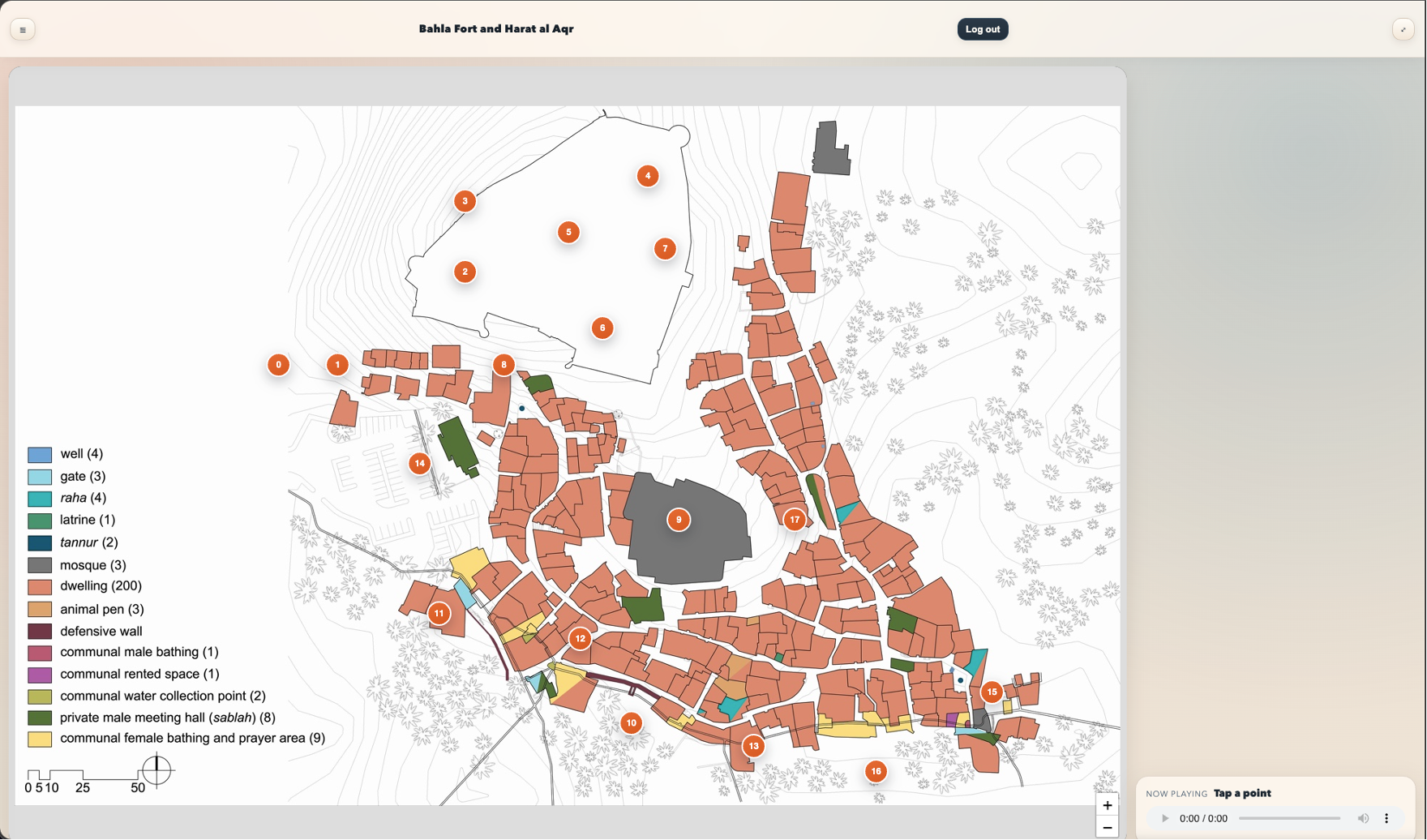
The Audio Guides Webapp is a mobile-friendly application designed for guided visits. Users open a location, tap numbered points of interest on a map, and listen to the related audio narration.
The system supports multiple locations organized in a hierarchical path (e.g. country/city/site) and can run entirely as a static website.
High-Level Architecture
The system is composed by:
- Web App Source and Deployment Layer: frontend code stored in GitLab and deployed through a GitLab CI/CD pipeline;
- Static Content Layer: location assets per site, such as
map.jpg,points.json, andaudio/*.mp3; - AI-Assisted Authoring Layer: ChatGPT-supported workflow for researching attractions and drafting the narration text;
- Audio Generation and Delivery Layer: Python-based script generation of audio files, Azure Blob Storage static hosting, and Azure CDN delivery.
Tech choices:
- Vanilla JavaScript, HTML, CSS;
- Leaflet for map rendering and interactions;
- Progressive Web App setup (
manifest.webmanifest+service-worker.js); - GitLab for source control and deployment pipeline;
- ChatGPT for interactive content drafting and script preparation;
- Python for text-to-audio file generation;
- Azure Blob Storage static website container for file hosting;
- Microsoft Azure CDN for content delivery to end users.
In particular, the components are the following:
- GitLab Repository: stores the web app code and triggers the deployment pipeline on updates.
- GitLab Pipeline: publishes frontend files and static guide assets into Azure Blob Storage.
- Navigation Drawer: hierarchical browser for available locations, with nested folders and location activation.
- Map Engine: supports both image-based maps (for custom guides) and OpenStreetMap fallback (for geo-based points).
- Audio Player: integrated player that loads and plays MP3 tracks linked to selected points.
- Authentication Gate: credentials-based access gate.
- ChatGPT Authoring Workflow: supports the iterative creation of historical guide text for each stop and attraction.
- Python Audio Builder: converts approved scripts into audio files that can be uploaded as static content.
- Local Cache: service worker caching strategy for core app files and guide assets (audio, maps, and metadata).
Deployment and content path:
- Frontend web app code is pushed to GitLab.
- A GitLab pipeline deploys the static web application files to Azure Blob Storage.
- ChatGPT is used interactively to prepare the textual content for each attraction and stop.
- A Python script converts the final text scripts into audio files.
- Audio files, maps, and metadata are uploaded to Azure Blob Storage as static assets.
- Azure CDN serves the hosted content from edge locations.
- The frontend running in mobile or desktop browsers consumes those static assets.

Low-Level Architecture
The system working operation can be described with four sub-sections:
- App Initialization and Access Flow;
- Location Loading and Rendering Flow;
- Audio Playback Flow;
- Offline Caching and Update Strategy.
App Initialization and Access Flow
At startup, the app checks whether the user session is already unlocked. If not, a credentials gate is shown. Once unlocked, the app loads the locations manifest and renders the location tree in the side drawer.
Main steps:
- Browser loads static assets (
index.html,styles.css,app.js,auth.js). - App checks local unlock state.
- If locked, credentials are requested.
- After successful unlock, locations are read from
assets/locations.json. - Navigation tree is rendered and the first location is loaded.
Location Loading and Rendering Flow
When a location is selected, the app reads its configuration and decides the rendering mode.
Main steps:
- User selects a location from the navigation tree.
- App loads
points.jsonfrom the location folder. - App checks if a custom map image (
map.jpg) exists. - If image exists, markers are projected from pixel coordinates using base image dimensions.
- If image does not exist, app falls back to OpenStreetMap and uses latitude/longitude points.
- Stops list is updated and markers become interactive.

Audio Playback Flow
Each marker is linked to one audio file based on its numeric id.
Main steps:
- User taps a marker.
- App resolves the file path (e.g.
audio/00.mp3,audio/01.mp3, …). - Player loads the selected source.
- UI updates the “Now playing” label.
- Re-tapping the same marker toggles pause/resume.
This approach keeps content management simple: updating narration usually means replacing MP3 files while preserving filenames.
Offline Caching and Update Strategy
A service worker caches:
- core shell files (HTML/CSS/JS/manifest/icons);
- location assets (
points.json, map files, and MP3 audio).
This allows faster repeated usage and optional offline experience after first load. For content rollouts, cache versioning can be incremented to force refresh of updated files.
Results
In this section there are the results of the project, in terms of screenshots of the webapp and a brief video that shows the working operation.
Notes for Media Replacement
When you share screenshots and the demo video, I will replace:
- image paths and captions in the Results section;
- the cover image in front matter (
image:); - the YouTube id in the shortcode.