The Operating Model Behind “Infinite Tokens”

Every time we were distributing development tasks, the same strange pattern appeared.
My colleague and I would look at what had to be done, split the work, and then compare progress later. Somehow I was managing to push a surprising amount of work through AI-assisted development while still having weekly allowance left. He could work through three or four issues in a day, while on some days I could clear forty or fifty. He was hitting limits more visibly. I was still moving.
After a while, this became a running joke.
“You have infinite tokens.”
It was not an accusation, and it was not a serious theory. It was just the easiest way to describe something that did not quite make sense from the outside. We were using similar AI coding tools, often with similar subscriptions, yet the difference in throughput was too large to ignore and too large, I think, to explain only with “more tokens.”
For a while I laughed it off, partly because I also did not know the answer. I knew I was using these tools heavily. I knew I had several workstreams open. I knew I was asking AI to do much more than write small snippets of code. But I was not sitting in front of a chat window all day typing prompts, so the simple explanation, “you are just using it more”, did not feel right.
Then, at some point, the joke stopped being only a joke.
Anthropic changed the usage experience around Claude Code. In its own Help Center, Anthropic says the Claude Code promotion “increased weekly usage limits in Claude Code by 50%” and that, starting September 14, 2026, “weekly limits in Claude Code are 25% higher than they were before the promotion” for Pro, Max, Team, and seat-based Enterprise plans.
Technically, that is not a cut below the original baseline. If the old limit was 100, the promotion took it to 150, and the permanent increase left it at 125. But if you had been working during the temporary promotion, the practical experience was still a reduction: 150 to 125 is roughly 17% less weekly capacity than the promotional level.
What surprised me was that the productivity hit felt larger than 17%. A smaller allowance should have made the workflow a little tighter; instead, it made me notice how dependent the whole setup had become on a certain amount of continuous capacity.
That was the moment when the “infinite tokens” joke became useful. If a 17% reduction in weekly capacity could be felt so clearly, then the interesting question was not whether I had too many tokens or too few. The interesting question was what kind of workflow I had built around them.
So I stopped guessing and looked at the local session logs.
1. The Token Numbers Were The Clue
The first reaction was simple: the number looked high.
In the rolling 14-day window I checked, across local Claude Code session logs, the usage showed:
| Metric | Value |
|---|---|
| Logged turns / usage records | 104,783 |
| Fresh input tokens | 208K |
| Cache-creation tokens | 677.1M |
| Output tokens | 52.1M |
| Cache-read tokens | 20.3B |
| Total counted tokens | 21.0B |
The screenshot of the usage summary makes the point more clearly than any sentence could: even the product view looked absurd at first glance.
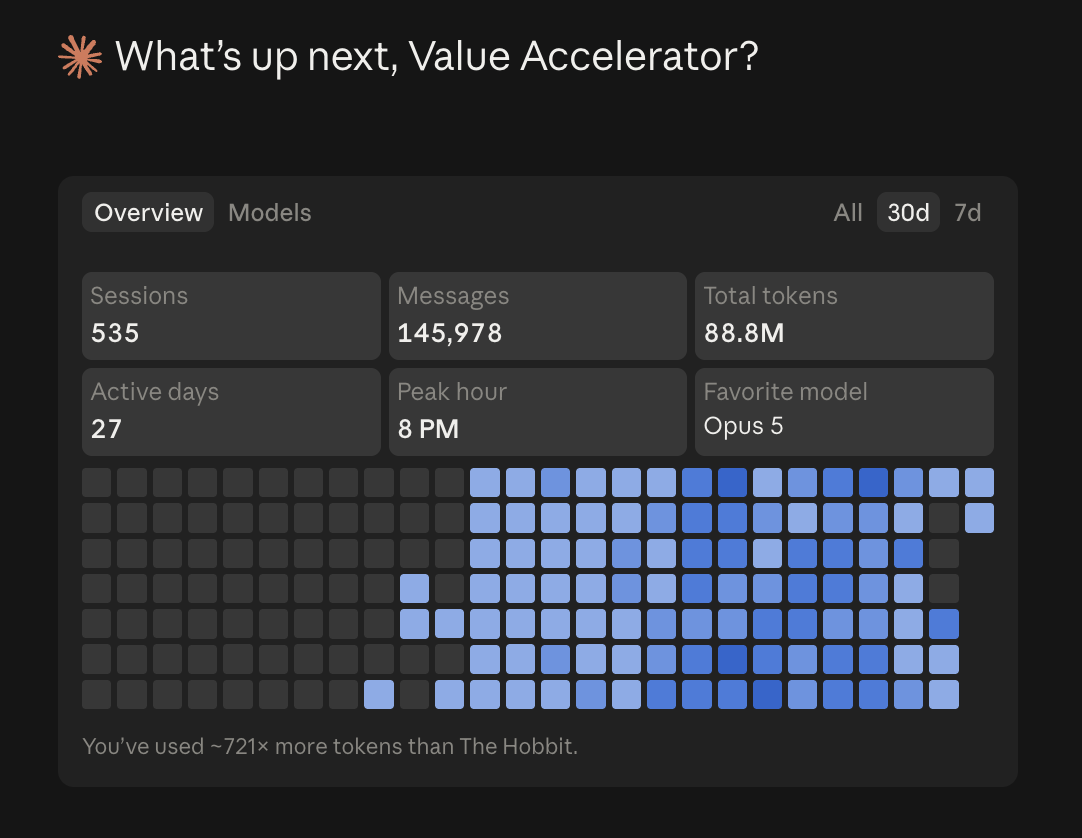
There is one caveat in the visual: the last days look lighter because I was on holiday and barely used it. So I would not read the heatmap as a perfectly normalized measure of my usual daily pace. It is better understood as the screenshot that made me ask the question, while the table above comes from the deeper local-log analysis.
This is not a billing statement. It is not the same as saying every token carried the same cost. It is a local-log view of what Claude Code sessions were doing, and in this workflow the dominant number was not fresh input or output; it was cached context being read again and again.
To make the scale more tangible, I also priced the same rolling 14-day local-log window as if it had been paid at current on-demand API/list prices. That came out at roughly $14,900 for the two-week window, or about $31,900 when scaled to a 30-day run rate. Looking at the actual rolling 30-day local-log window, the estimate was even higher: about $38,500. Again, that is not my bill; on a Max subscription the real constraint is the usage limit, not a per-token invoice. But it is useful as a comparison point, because one widely shared heavy-user benchmark reported a peak month of $5,623 in API-equivalent Claude Code usage. Depending on whether I use the 14-day run rate or the actual 30-day window, my local-log estimate was about 5.7x to 6.9x that public heavy-user benchmark.
Still, the signal was clear enough. The “infinite tokens” joke had a real basis; I was not imagining the scale.
At the same time, the table made the story more interesting, not less. If the important number had been only output tokens, the explanation would have been simple: more generation, more work. But the largest number was cache-read tokens, which suggested that the system was not only producing code. It was repeatedly operating inside a large context.
That changed the question for me. I was no longer only asking how many tokens I had used; I was trying to understand why my setup was producing a very different throughput profile from a similar subscription used in a more conventional way.
2. The Workflow Was Built Around My Constraints
The easy explanation would be: I got more done because I used more AI.
I do not think that is precise enough. We had the same type of subscription, so in principle we had access to the same allowance. If the difference had been only the number of available tokens, the throughput gap should not have been that large: three or four issues a day on one side, sometimes forty or fifty on mine.
And if I had simply been typing more prompts than my colleague, the answer would have been uninteresting, and frankly not very useful. But that was not the pattern. I was not spending my whole day inside the chat interface, and I was not manually steering every micro-step; the whole reason the workflow existed was that I do not have time to do that.
So the workflow evolved around a constraint: I need to be able to express demand quickly, let the system process it, and come back at the points where human judgment actually matters. The main change was not a better prompt; it was automating more of the demand management around the work.
That starts before development.
I do not always write a clean specification. Sometimes the input is a voice note. Sometimes it is text. Sometimes it is a screenshot of a broken or confusing screen. Sometimes it is a short UAT video where I explain what feels wrong while clicking through the product. In that case the workflow does not only transcribe the audio; it can analyze the video, listen to what I am saying, take screenshots or frames from the relevant moments, and use both the spoken feedback and the visual evidence to understand the demand. Sometimes the input is a transcript, a rough backlog note, or a GitHub issue that is only half-formed.
The important part is that those inputs should not remain messy forever. They need to become something a development agent can act on: a clearer issue, acceptance criteria, test cases, definition of done, scope boundaries, and enough context to understand where the work probably lives.
That is the demand side of the workflow. An agentic layer takes the raw input, extracts the demand, and checks it against what already exists before it becomes development work. To make that possible, each repository has two important pieces of context.
The first is a set of repository guidelines. For each repository, I define how I want the code, infrastructure, architecture, UX/UI, testing, documentation, deployment, and operations to evolve. These are not just style preferences; they describe the direction of the system and the constraints the agent should respect before proposing or implementing changes. They also explain what deployment means in that repository, which automated checks matter, what kind of tests should be created for different classes of changes, and which gates are light enough for normal development versus which ones belong to release or production promotion.
The second is an updated functional document, basically a Markdown file that describes the relevant functionality, where it lives, what it does, and how it behaves. The agent does not need to scan the entire codebase every time just to understand whether a request is new or already covered; it can start from the repository guidelines and the functional document, compare the demand with the current product behavior, and identify what is already there, what needs to be modified, and what is genuinely new.
Only after that does it go into the backlog. At that point the backlog is not only a list of things to build; it is also how I manage the UAT scope. It helps separate what is being implemented, what is ready to test, what still needs review, and what can actually be considered done.
The development side is different. Once the work is clear enough, I often rely on longer sessions rather than constant chat. The agent can inspect the repository, follow the rules of the project, implement, generate or update the required automated tests, run the appropriate checks, update documentation, and come back when it hits a control point. That does not mean I disappear. It means I do not need to be present for every intermediate step.
The reason this can work is that the workflow is constrained. There are approval points that I keep deliberately human: important UX/UI decisions, deviations from repository guidelines, risky architectural choices, changes that affect deployment, and the final move from test to done after UAT. In other words, the system can move, but it does not get unlimited authority.
For me, this distinction matters a lot.
Using AI as a chat assistant means the human is still the main process manager. The model waits, answers, waits again, and the user carries the context of what should happen next. Using AI as part of an engineering workflow is different. The system has to know how demand enters, how work is translated, how the backlog defines scope, where context lives, what rules apply, which decisions need approval, when a session can continue, and when it must stop.
That is why a 17% reduction in capacity felt larger than 17%. If your workflow is linear and interactive, a smaller allowance may simply mean you stop a bit earlier. If your workflow depends on multiple long-running sessions, cached context, and background development work, a reduction in capacity can interrupt momentum in a way that feels larger than the raw percentage.
The limit did not only reduce quantity.
It exposed the shape of the workflow.
3. The Tooling Layer Matters More Than The Prompt
Once I started looking at the setup, I realized that the workflow was not only a question of how I talked to the model. It was also a question of the tooling and control layer around it.
AI coding becomes expensive, slow, or unreliable when every session has to rediscover the same product. A model can burn a lot of context simply figuring out where a feature lives, which files matter, which tests cover the behavior, what the architectural rules are, and whether a request overlaps with something already in the backlog.
So I started caring much more about maps.
One part is graph-based navigation. Before asking an agent to read broadly, I want it to find the likely entry points, dependencies, tests, and related files. This is where tools like Graphify matter for me: not as a magic layer, but as a way to avoid making the model wander through the codebase blindly.
Another part is functional documentation. I keep a live functional view of what the product does, where functionality lives, how it is supposed to behave, and how it should be validated. That document is not only for humans. It becomes context for the demand workflow as well. If a new request arrives through a video, screenshot, or rough note, the system can compare it against what already exists instead of treating every request as if the product were unknown.
The third part is explicit rules. Architecture, testing, UX/UI, documentation, operations, and deployment all need guidelines. If I say “deploy to production”, the agent should not invent what that means. It should know the procedure, the checks, the intended outcome, and the points where it needs approval. The same applies to tests: the repository should make clear which automated tests are expected for a new endpoint, a UI change, a data-model change, or a deployment-sensitive change, and which test layers are mandatory versus optional or release-gated. If a task requires deviating from architecture guidelines, skipping a required test layer, or changing the deployment path, the right behavior is not to improvise silently; it is to ask.
This is also where model and provider choice becomes part of the tooling layer.
I do not think one model should do everything. Some tasks benefit from a model that is strong in long-running development and design-sensitive implementation. Some tasks are better suited for demand-side analysis, structuring requirements, or functional reasoning. Some repetitive or text-only work can be routed to cheaper models or providers, as long as the scope is clear and the quality risk is acceptable.
In practice, I tend to reserve Opus for complex development work, especially when repository context, architecture, and UX/UI judgment matter. If the task is simpler, Sonnet is often enough. For very heavy development workflows, I use the highest-intensity coding mode available to me, because the extra reasoning and persistence can be worth the additional capacity it consumes.
On the demand side, ChatGPT with Codex-style agentic workflows is often good enough: it can analyze inputs, structure requirements, reason through functional behavior, and produce the kind of implementation-ready issues I need. For simpler development work, DeepSeek Pro is useful because it is inexpensive and capable enough for text-heavy tasks. I avoid using it for UX/UI-heavy work, not because it is bad, but because a text-only workflow makes design judgment and multimodal inspection harder.
That is not disloyalty to a vendor. It is just using the right tool for the right part of the system.
There is also a learning component. I use a lot of self-learning in the workflow, so the system gradually captures what “good” looks like for me across code, architecture, UX/UI, testing, documentation, and delivery. That reduces the need to go endlessly into prompt-engineering rabbit holes where every preference has to be restated as a declarative rule. The system should not only remember the target; it should remember how it reached good results before.
This matters because token efficiency is not only about spending fewer tokens. Sometimes spending tokens is exactly what you want, if the model is reading the right context and doing useful work. The waste is not usage itself. The waste is repeated rediscovery, poor routing, vague requirements, missing rules, and long sessions that continue without enough structure.
At scale, context is not something you paste into a prompt.
It becomes infrastructure.
4. The Bottleneck Moves
The most important lesson is not that AI can generate more code.
That is already obvious.
The more interesting lesson is that, once the workflow starts working, the bottleneck moves.
Before, the scarce resource was often implementation time. Could I get the feature built? Could I fix the bug? Could I update the infrastructure? Could I write the tests? AI-assisted development changes that equation. A large chunk of development and infrastructure work can move faster, especially when demand is structured, context is reusable, and the tooling layer keeps the model inside the right boundaries.
But the hard parts do not disappear. They move toward intent, review, testing, and acceptance.
This is where I think some of the AI productivity discussion becomes too optimistic. It is easy to show a model generating a feature. It is harder to know whether the feature is the right one, whether it handles the edge cases, whether it respects the product direction, whether it broke another workflow, and whether the system actually did what it claimed to do.
I have seen this enough times to take it seriously: an agent says something is done, and then, after checking, it turns out that a piece is missing or the implementation is not where it should be. It is not the dominant case, but it happens. Automated tests help, and I rely on them heavily, but automated tests are not the same as product acceptance. You still need code review, UAT, and a human who can say: this is actually what we needed.
One change I made because of this is to put AI itself in a more adversarial mode at the end of development or bug resolution. Instead of accepting the first “done”, I want the system to check its own work: re-read the requirement, compare the implementation against the expected behavior, inspect whether the tests actually cover the change, and look for reasons the fix might be incomplete. This clearly uses more tokens, but it buys back human time and reduces the chance that I only discover the gap during manual review.
So the job changes.
Less time is spent manually pushing every implementation step. More time is spent defining what good looks like, designing the workflow, setting the constraints, checking the evidence, reviewing outcomes, and deciding whether the work should move forward.
That part can be less glamorous than building. Sometimes it is less motivating, too, because review is not the same emotional experience as creation. But it is where the leverage has to be controlled. If AI can produce more work than I can responsibly validate, then the bottleneck has not disappeared; it has simply moved to the validation layer.
That is why I do not see this as a story about “infinite tokens”.
I see it as a story about a new operating model.
Conclusion: Not A Science, But A Working Practice
I do not want to present this as a universal recipe. A lot of it is still experimentation: trying different ways of working, seeing what actually helps, and being honest about what does not.
The workflow works well for me because it matches my constraints. I cannot stay in chat all day. I need to pass demand quickly. I need long-running sessions that can operate with enough context. I need tools that reduce rediscovery. I need clear rules for architecture, testing, UX/UI, operations, and deployment. I need different models and providers for different jobs. And I still need human review, testing, and UAT at the end.
The “infinite tokens” joke was only the trigger.
The real topic is how AI changes the operating model of software work once you stop treating it as a chat window and start treating it as part of the development system.
That is why I wanted to write this down: partly to share what I have learned, and partly because I know this is not finished. This is not a science yet; at least for me, it is still a lot of trial and error. That is also why exchanging with other practitioners is so valuable. I would be very interested in comparing notes with people who are building their own AI coding workflows: what they automate, where they keep control points, how they route models, how they test, and what they have learned the hard way.
And of course, if someone is curious about what I am building with Value Accelerator, that is another conversation too. Not completely unrelated, but I will pretend this article was only about engineering practice.
Sources:
- Claude Help Center, “Claude Code May-August 2026 weekly limits promotion”: Anthropic says the promotion increased Claude Code weekly usage limits by 50%, ran from May 13 through September 13, 2026, and left weekly limits 25% higher than before the promotion from September 14, 2026.
- Claude Help Center, “What is the Max plan?”: Max plan usage includes five-hour session limits and weekly usage limits.
- Claude Help Center, “Use Claude Code with your Pro or Max plan”: Claude Code usage is shared with Claude usage on Pro and Max plans.
- KSRED, “Claude Code Pricing Guide: Which Plan Actually Saves You Money?”: public heavy-user benchmark reporting a peak month of $5,623 in API-equivalent Claude Code usage.